What is a call disposition? (With a code list for pay-per-call)
A call disposition is the recorded outcome of a phone call. After the call ends, an agent or the system assigns one, such as "not qualified" or "left a voicemail".
A disposition code is the short label for that outcome. The codes let a team count what happened and decide what to do next.
Why a call disposition matters
A call log can show that a call happened without showing how it went. A disposition closes that gap, so you can count, filter and act on each call.
- Follow-up. The code can decide whether anyone calls back. "Callback" means another call. "Do not call" means the calling stops.
- Reporting. Counted across a campaign, codes show where calls go wrong. A run of wrong numbers can point at a traffic source, the party that sent those calls.
- Review. A code tells a reviewer which call recordings to play first.
A general list of call disposition codes
The table below is a general industry example. It is not a TrackDrive list. Names and short codes differ from one call center to the next, so treat every row as an illustration.
TrackDrive's own default list comes later in this article.
| General industry example | Illustrative code | What it usually means | Usual next step |
|---|---|---|---|
| No Answer | NA | The call rang out | Try again later |
| Busy | BZ | The line was busy | Try again later |
| Answering Machine | AM | A machine picked up | Retry or leave a message |
| Voicemail Left | VM | A message was left | Wait, then retry |
| Dead Air | DAIR | Nobody was on the line | Check the source |
| Fax | FAX | A fax machine answered | Remove the number |
| Wrong Number | WN | The wrong person was reached | Remove the number |
| Not Interested | NI | The person declined | Stop, or wait a while |
| Not Qualified | NQ | The caller doesn't fit the campaign | Stop |
| Hung Up | HU | The caller ended the call early | Review the call |
| Duplicate | DUP | The same caller was already handled | Check before counting it |
| Do Not Call | DNC | The person asked not to be called again | Stop all contact |
| Interested | INT | The person wants to continue | Follow up |
| Callback | CB | The person asked for another time | Schedule it |
| Transferred | XFER | The call was handed to a buyer | Confirm it connected |
| Transfer Failed | XFAIL | Nobody took the handoff | Try another buyer or call back |
| Appointment Set | APPT | A time was booked | Confirm the time |
You won't find a sale in that list. Pay-per-call is a model where a business pays for phone calls instead of clicks.
In that model, a sale is a conversion, which is tracked separately.
The pay per call vs pay per lead guide covers how the model compares.
Inbound and outbound call disposition examples
These are general examples too. Inbound codes lean toward why the person called and where the call went: Not Qualified, Wrong Number, Transferred.
Outbound codes lean toward whether you reached anyone: No Answer, Busy, Answering Machine, Callback.
Many businesses also need codes specific to their workflow. TrackDrive's help centre gives two examples:
- A health insurance call center might add "Has Coverage Now", "Under 65" and "Already Enrolled".
- A home services company might add "Appointment Set", "Out of Service Area" and "Rental Property".
How to keep a code list useful
- One meaning per code. Agents pick quickly, and unclear names lead to misclassified calls.
- One next step per code. If two codes lead to the same step and you never report them apart, merge them.
- Keep it short. TrackDrive's help centre says to aim for 10 to 20, because too many choices slow agents down.
- Prune it. Review how often each code is used. Remove or merge the ones that rarely appear.
A disposition, a status and a conversion are different things
These three words get mixed up, and they answer different questions.
- Call status is the technical state of the call, such as no answer, busy or completed.
- Disposition is the outcome of the call, in your team's own labels.
- Conversion means the call produced a billable outcome.
A buyer is the business that receives and pays for calls. In TrackDrive, a conversion drives the revenue figure for the buyer and the payout figure for the traffic source.
TrackDrive tracks those earnings; it never pays anyone out.
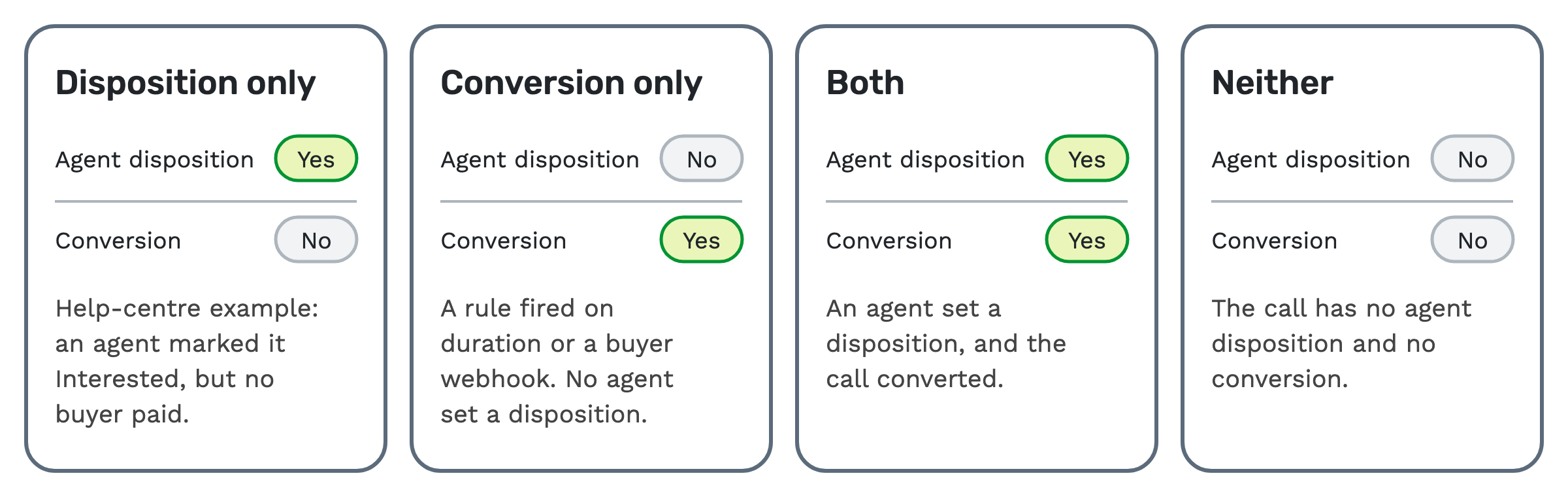
A disposition and a conversion don't depend on each other. A call can have any of these four combinations:
- Disposition only. An agent marked it "Interested", but no buyer paid.
- Conversion only. A rule fired on duration or a buyer webhook, and no agent set a disposition.
- Both. An agent set a disposition, and the call converted.
- Neither. The call has no agent disposition and no conversion.
How dispositions work in TrackDrive
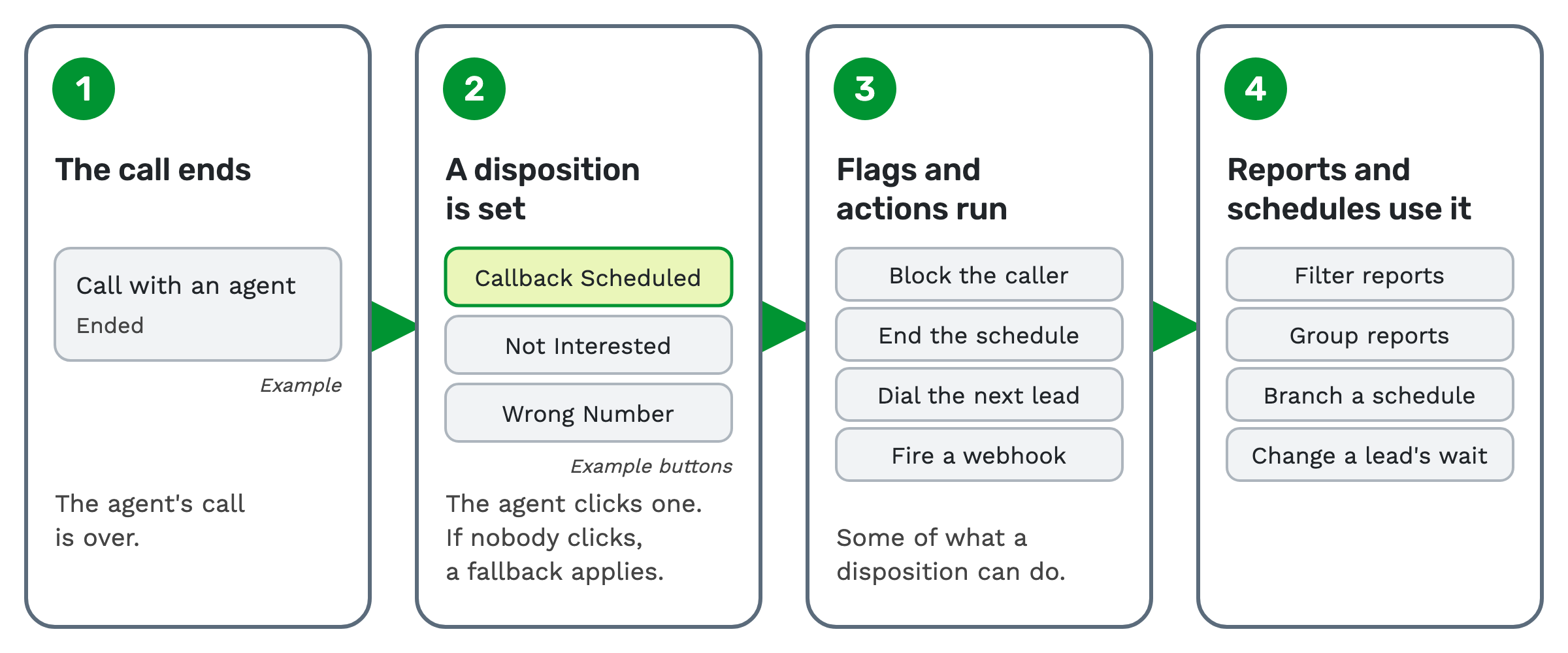
The rest of this article is about TrackDrive itself. Here are the four steps.
1. The call ends. The agent's call is over.
2. A disposition is set. In the agent widget, the browser softphone agents use during Power Dialer sessions, the agent clicks one colored button. The buttons exclude system dispositions and are filtered by the call's tokens. A token is one named piece of call data.
3. Flags and actions run. A flag is a setting on the disposition that triggers an automatic effect.
4. Reports and schedules use it. Reports can filter and group by disposition, and a schedule can branch on it. A schedule is the automated sequence of steps TrackDrive runs for a lead.
TrackDrive's default dispositions
When a company is created, TrackDrive provisions 16 default disposition records. Unlike the general table above, this is TrackDrive's own list. Companies can change these defaults and add their own.
| TrackDrive default | What the help centre says it means |
|---|---|
| Leave Voicemail | Plays the recorded voicemail file |
| VM Detected | Agent detected voicemail but is instructed not to leave one |
| Disqualified | Lead data disqualifies the lead |
| Not Interested | Lead verbalized no interest |
| Not Interested / Hang Up | Lead hung up with intent |
| Add to DNC | Lead asked to not be called again |
| Successful Transfer | Call transferred to a buyer |
| Transfer Failed | Transfer attempted but no buyer accepted |
| Transfer Failed / Set Callback | Transfer failed, callback scheduled |
| Callback Scheduled | Lead asked to be called back |
| Dead Air | No one on the line when lead entered conference |
| Wrong Number | Lead stated wrong number |
| Did Not Apply | Lead never filled out a form |
| Auto Attendant | Recorded message detected |
| Fax Machine | Fax machine was dialed |
| Agent Disposition Timeout | Auto-set if the agent does not disposition within the timeout window |
To add one, you create a custom disposition with a name, a hint and button colors. It can also be filtered by tokens, such as the offer or schedule, so it appears only on matching calls. An offer is the campaign a call belongs to.
What happens when nobody picks one
Agent Disposition Timeout is the default fallback when no selection is made in the timeout window. Only one disposition per company can be the fallback.
The system also generates dispositions from call status values, such as no answer, busy or completed, when a call ends without an agent-chosen disposition. Those are hidden from the agent widget.
Each call has exactly one agent disposition record. It captures which labels the agent checked, any notes and the time.
What a disposition can do on its own
Each disposition template carries action flags. When an agent selects a flagged disposition, the effects happen immediately, and the agent has nothing more to do.
- Mark the call as answered, agent handled, buyer handled, qualified or machine detected.
- End the schedule, moving the lead to its end-of-schedule actions.
- Block the caller from future inbound and outbound contact.
- Opt the lead out of all calls, SMS and email.
- Add the caller to the schedule's suppression list, its list of people not to contact.
- Place an immediate callback, or delete the caller's scheduled callbacks on the offer.
- Dial the next lead for the agent automatically.
- Require notes before the disposition can be selected.
A disposition can also have schedule actions attached. They run with a 5-second delay and are deduplicated for 1 hour to prevent repeat execution.
TrackDrive's agent feature page sums it up: "Custom disposition codes can fire webhooks, update lead data, and add callers to your DNC."
A webhook sends call data to another system when something happens. See webhooks for call tracking.
Dispositions and do-not-call
A DNC, or do-not-call, entry stops future contact with a person. In TrackDrive, a disposition configured to stop the lead sets the lead's status to "Do Not Call" and marks its contact.
Future leads created with the same phone number inherit that state. Enforcement happens at the contact level, through suppression and the blacklist.
This is general education, not legal advice. TrackDrive doesn't pre-check leads against the federal Do Not Call registry; scrub your lists before import. See what call scrubbing means.
TrackDrive's suppression tools help you run an outbound program, but they "do not, on their own, guarantee compliance."
How dispositions shape follow-up and reports
Lead wait rules can change how long a lead waits based on its disposition history. A rule can check the disposition on the lead's most recent calls.
The help centre gives an example group, and none of it is a default. A lead marked "interested" waits 5 minutes, an unanswered lead waits 1 hour, and any other lead waits 2 hours.
Each call's disposition also sits in the call log, so you can read it beside the call's source and offer. The pay-per-call numbers to watch covers what to do with those counts.
What a buyer reports back
A buyer's confirmation of a sale can arrive as a conversion.
A buyer can post to a conversion webhook at the end of the call to confirm the sale. A call can also convert by rule, when it lasts longer than a set threshold or matches a buyer's conversion rule.
When a short list is enough
If every call forwards straight to a buyer and no agents work in TrackDrive, you may not need custom dispositions at all. Call status and conversions may tell you what you need.
If agents do take calls, start with the defaults. Add a code only when it changes what happens next.
Questions people ask
What does call disposition mean? It means the outcome of a call, recorded after the call ends by an agent or the system.
What is an example of a call disposition? "Not qualified" and "left a voicemail" are two examples from TrackDrive's help centre. A callback request is another.
Is a sale a call disposition? In TrackDrive, a sale is tracked as a conversion, which is separate from the disposition.
Does an agent have to pick one? If the agent doesn't pick one inside the timeout window, Agent Disposition Timeout is applied by default.
Is there a charge for dispositions? TrackDrive's pricing page has no separate line for dispositions. Schedule steps such as a webhook or email have a per-action rate. A call placed by a flag, such as a callback, is billed as outbound dialing. Check that page before you use either.
See it in action
Request a demo for a live walkthrough tailored to your use case, or start free, with no credit card and no onboarding fee.